



250.00 SEK
In stock

Brand: Retrofit.nu
Reference: AUD-A4B9-ACT-TA
Brand: Audi
Reference: AUD-A5F5-ACT-TSR
Brand: Audi
Reference: AUD-ETGE-ACT-FOD-BUNDLE
Brand: Audi
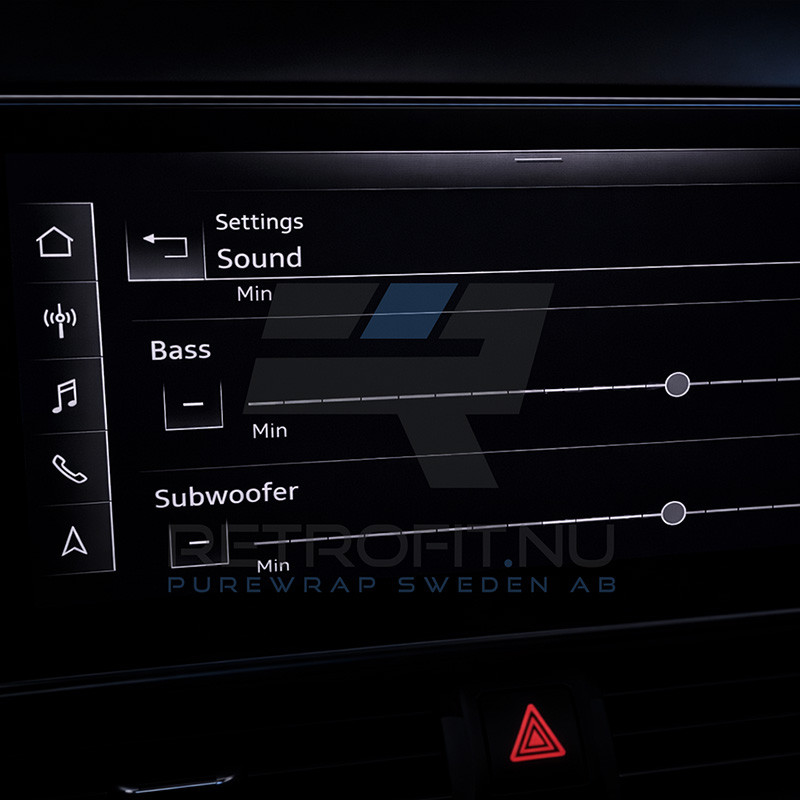
Many Audi e-tron GE vehicles with Audi Sound System (PR-9VD) are limited to basic Bass and Treble adjustment from factory. The subwoofer is installed and active, but cannot be adjusted separately in the MMI.
This activation unlocks the hidden subwoofer menu, allowing independent adjustment of Bass and Subwoofer levels for a more precise and refined sound setup.
Using RetroLab Pro, the activation is performed through a guided, VIN-specific OEM process — no dealer visit, no remote coding session, and no manual scripts required.
After purchase, the activation is assigned to your vehicle’s VIN. Using a Windows PC and an ENet cable, you connect to the vehicle and perform the activation using RetroLab Pro. The required configuration is applied automatically to enable the subwoofer menu in the MMI.
This subwoofer menu activation is also available for other compatible Audi models:
Below are some common questions about subwoofer menu activation.
Do I need additional hardware?
No. The vehicle must already have Audi Sound System (PR-9VD) with a factory-installed subwoofer.
What changes after activation?
A separate subwoofer adjustment becomes available in the MMI.
Will this improve the sound experience?
Yes. It allows better control of low frequencies and overall balance.
Is remote coding required?
No. Everything is done locally via RetroLab Pro.
Starting from model year 2024, most Audi vehicles are equipped with SFD2 (Schutz der Fahrzeugdiagnose 2) security protection. This system prevents remote coding, dataset uploads and activations outside of authorized workshop environments.
If your vehicle has one of the following PR codes, it is protected by SFD2:
Vehicles with SFD2 cannot be activated remotely.
For these vehicles, we only offer installation and activation at our workshop in Vellinge, Sweden. If you are unsure whether your vehicle has SFD2, please contact us before ordering.
All coding, adaptations and feature activations are performed using RetroLab Pro. No third-party tools, scripts or manual coding are required.
Hardware installation must be carried out according to Audi factory repair manuals and wiring diagrams. We do not provide trim removal or mechanical disassembly guides.
You must be comfortable working on your vehicle or have a professional workshop perform the installation. Remote activation support is available if required (additional cost may apply).
Brand: Retrofit.nu
Unlock subwoofer menu in Audi e-tron GE (2021–2023). Adjust bass and subwoofer separately with OEM activation via RetroLab Pro.